
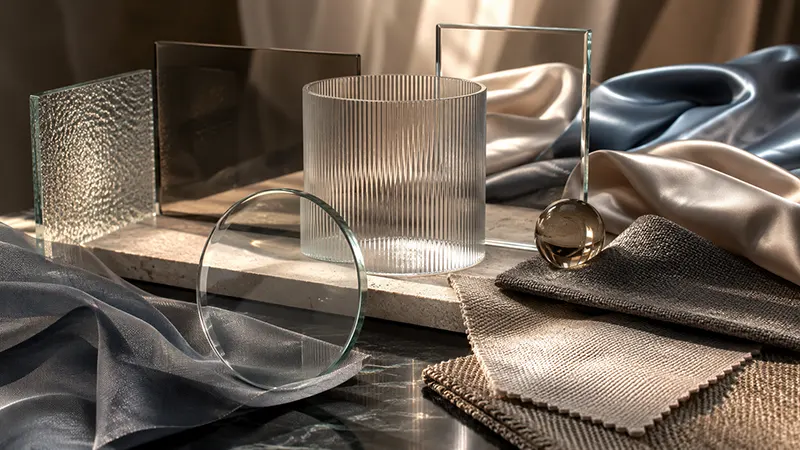
In digital graphics design, realism has become one of the most sought-after qualities. Whether you’re designing product mockups, marketing materials, social media graphics, or digital artwork, creating authentic-looking glass and fabric textures can significantly improve the visual impact of your work. Fortunately, Canva has evolved beyond a simple graphic design platform by introducing advanced design features, AI-powered tools, and realistic visual effects that help creators produce professional-quality tactile surfaces without requiring advanced 3D software.
Although Canva is not a dedicated 3D modeling application like Blender or Cinema 4D, its growing collection of design tools allows users to simulate realistic materials through clever use of transparency, gradients, shadows, overlays, textures, and AI-powered editing. These capabilities make Canva an excellent solution for designers who want attractive visual results quickly.
This article explores how Canva can be used to create convincing glass and fabric surface textures while maintaining a polished, professional appearance.
Why Realistic Surface Textures Matter
Texture is one of the most important elements of visual design because it adds depth, realism, and emotional appeal. Smooth glass conveys elegance and sophistication, while fabric introduces warmth, softness, and luxury.
Brands frequently use realistic materials in:
- Product advertisements
- Packaging mockups
- Website hero images
- Fashion presentations
- Furniture catalogs
- Interior design concepts
- Social media marketing
- Digital portfolios
Even subtle texture effects can make flat graphics feel immersive and premium.
Canva’s Growing Design Capabilities
Over the past few years, Canva has expanded its design ecosystem considerably. Instead of only offering templates and icons, the platform now includes features such as:
- Magic Studio AI
- Background Remover
- Magic Edit
- Magic Expand
- Shadow Effects
- Blur Effects
- Gradient Elements
- Layer Management
- Transparency Controls
- Extensive Texture Libraries
- Mockup Generator
- Smart Photo Editing
These features work together to simulate depth and tactile qualities that previously required professional image editing software.
Creating Realistic Glass Effects
Glass is one of the most challenging materials to reproduce because it depends on transparency, reflection, refraction, and lighting.
Fortunately, Canva offers several tools that help recreate these characteristics.
1. Transparency Controls
Real glass is never completely invisible. It slightly softens whatever appears behind it.
Using Canva’s transparency slider allows designers to create:
- Frosted glass panels
- Acrylic cards
- Glass buttons
- Transparent UI components
- Product packaging
Lower opacity combined with background blur creates convincing glass surfaces.
2. Blur Effects
Modern “glassmorphism” has become one of today’s most popular interface styles.
Canva allows designers to combine:
- Blurred backgrounds
- Semi-transparent overlays
- Soft borders
- Rounded corners
- Light gradients
Together, these create elegant glass panels commonly seen in websites, mobile apps, and presentations.
3. Gradient Overlays
Real glass catches light differently depending on its angle.
Gradient elements can simulate:
- Reflections
- Highlights
- Curved edges
- Light refraction
- Glossy finishes
Applying subtle white gradients with reduced opacity often produces the illusion of polished glass.
4. Shadow Effects
Glass rarely casts harsh shadows.
Instead, Canva’s shadow effects allow designers to create:
- Soft drop shadows
- Ambient lighting
- Floating cards
- Elevated glass panels
Combining delicate shadows with transparency enhances realism.
Designing Fabric Surface Textures
Unlike glass, fabric depends on softness, weave patterns, folds, and lighting.
Canva offers multiple ways to imitate textile materials.
Using Texture Elements
Canva’s Elements library contains numerous fabric-inspired graphics including:
- Linen
- Cotton
- Canvas
- Silk
- Wool
- Denim
- Velvet
- Leather
These textures can be layered underneath objects or blended into backgrounds.
Overlay Techniques
Designers often create fabric effects by stacking multiple layers.
For example:
- Neutral fabric texture
- Soft gradient
- Reduced opacity
- Slight blur
- Grain overlay
This combination creates surprisingly realistic textile surfaces.
Adding Wrinkles and Depth
Fabric naturally bends and folds.
Canva’s shadow tools can simulate:
- Fold lines
- Cushion depth
- Clothing wrinkles
- Draped materials
Even subtle shadows dramatically improve realism.
AI-Powered Editing Makes Texture Creation Easier
One of Canva’s biggest advantages today is its AI-powered editing system.
Features such as Magic Edit help users transform flat images into more realistic scenes.
For example, AI can assist with:
- Changing fabric colors
- Adding decorative materials
- Improving reflections
- Extending backgrounds
- Replacing objects
- Matching lighting
These tools reduce editing time while maintaining professional quality.
Combining Glass and Fabric in Product Design
Many modern products combine multiple materials.
Examples include:
- Luxury handbags
- Cosmetic packaging
- Furniture
- Smartphones
- Fashion accessories
- Interior decor
Within Canva, designers can build layered compositions where:
- Transparent glass bottles sit on linen fabric.
- Frosted acrylic panels float above textured backgrounds.
- Soft textiles contrast against reflective surfaces.
The visual contrast creates a premium appearance.
Smart Lighting Techniques
Lighting often determines whether a texture appears realistic.
When working inside Canva, designers should think about where light originates.
For glass:
- Bright highlights
- Thin reflections
- Soft transparency
- Gentle glow
For fabric:
- Smooth gradients
- Fold shadows
- Warm highlights
- Directional lighting
Maintaining consistent lighting across every design element makes the entire composition appear more believable.
Color Choices That Improve Realism
Color also influences perceived texture.
Glass often works best with:
- White
- Ice blue
- Pale gray
- Soft cyan
- Transparent gradients
Fabric typically benefits from:
- Earth tones
- Warm neutrals
- Natural fibers
- Rich jewel colors
- Muted palettes
Avoid using overly saturated colors unless creating stylized artwork.
Canva Mockups Enhance Material Presentation
Canva’s mockup feature helps place designs into realistic environments.
Examples include:
- Product packaging
- T-shirts
- Pillows
- Phone screens
- Bottles
- Business cards
- Posters
Applying realistic textures before placing items into mockups increases visual credibility.
Best Practices for Professional Results
To create realistic tactile surfaces inside Canva:
- Use multiple layers instead of relying on one texture.
- Keep transparency subtle.
- Apply soft shadows rather than harsh ones.
- Maintain consistent lighting direction.
- Blend gradients carefully.
- Avoid excessive filters.
- Use high-resolution texture elements.
- Leave sufficient negative space.
- Balance realism with clean design.
Small refinements often make a significant difference.
Common Mistakes to Avoid
Designers sometimes reduce realism by:
- Using shadows that are too dark.
- Applying excessive transparency.
- Combining inconsistent lighting angles.
- Stretching texture images.
- Overusing blur effects.
- Adding too many competing materials.
- Ignoring scale relationships.
Keeping effects subtle generally produces the most convincing results.
The Future of Tactile Design in Canva
As Canva continues expanding its AI capabilities, realistic material rendering is becoming increasingly accessible. Features like Magic Studio, intelligent editing, and improved texture libraries are narrowing the gap between beginner-friendly design tools and professional creative software.
For marketers, entrepreneurs, educators, and content creators, Canva now offers an efficient way to produce sophisticated visuals that incorporate the appearance of glass, fabric, and other tactile materials without requiring advanced 3D modeling expertise.
For the review, creating realistic glass and fabric surface textures no longer requires expensive software or years of experience. Canva’s expanding toolkit—including transparency controls, gradients, blur effects, shadow customization, texture libraries, AI-powered editing, and mockup capabilities—provides designers with everything needed to build visually compelling, professional-quality graphics.
By thoughtfully combining layers, lighting, texture, and color, designers can simulate premium tactile materials that enhance branding, product presentations, marketing campaigns, and digital experiences. As Canva continues to innovate, its role in accessible, high-quality visual design will only continue to grow, making realistic material effects easier than ever for creators of all skill levels.
